
GoHighLevel contact quick actions for a busy counter
GoHighLevel contact quick actions put one-tap tags and buttons on every contact record. Tap “Card declined” or “Send rewash coupon” and the matching workflow runs, while the next car is already at the pay station.
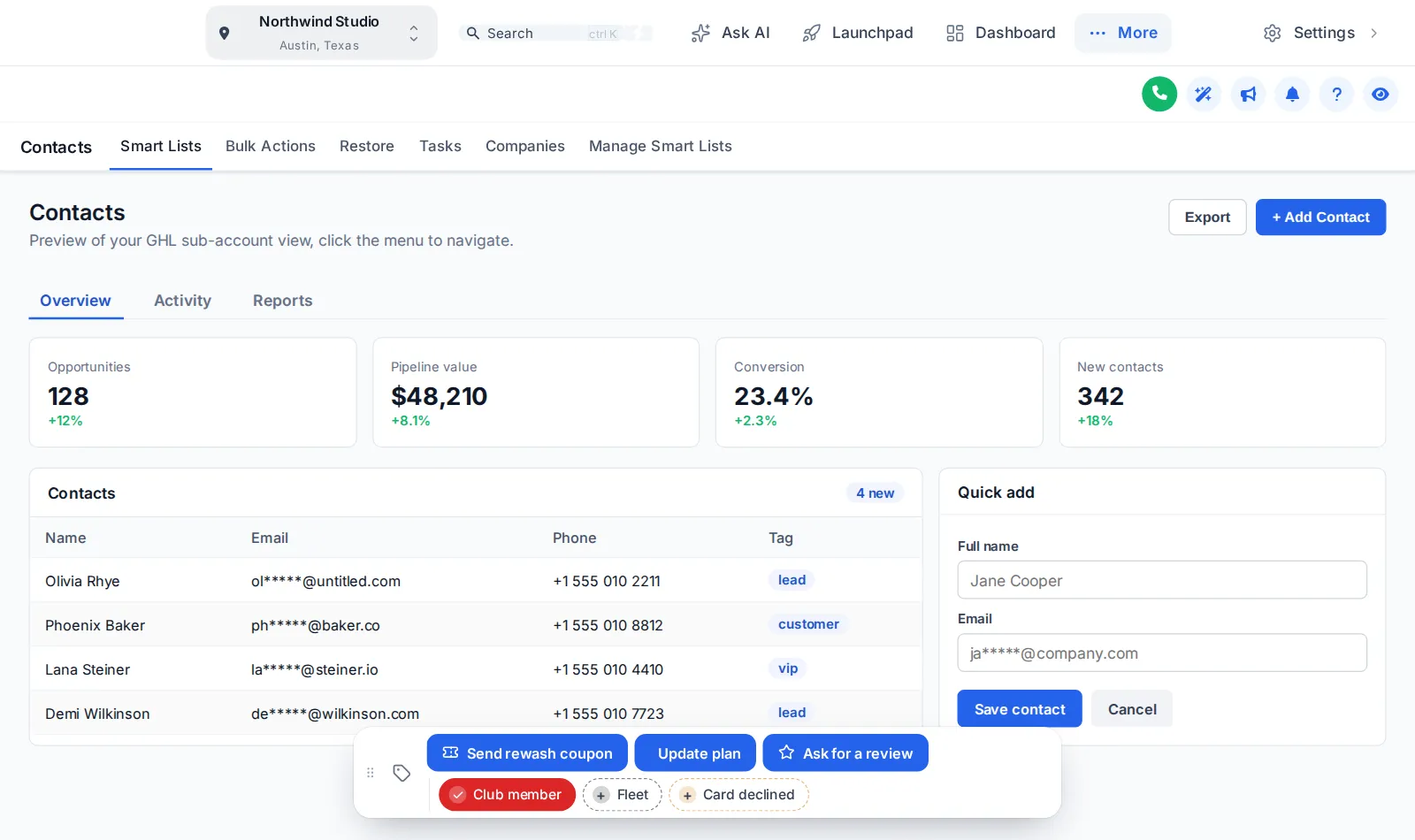
Tap tags, open the form, drag the bar
Loaded with wash tags. Nothing is saved in the preview; inside GoHighLevel the contact updates immediately.
Pulling into the bay…
Now showingButtons and tagsThis is the real contact actions bar. Tap a quick tag to add or remove it, press Update plan to open its form, or drag the bar by its grip. Nothing is saved in the preview; inside GoHighLevel the contact updates straight away.
Tap here, this happens
Example wash set-ups. The bar adds the tag; a GoHighLevel workflow you build reacts to it.
| Staff taps | Type | Your workflow then |
|---|---|---|
| Club member | Quick tag | Your “member welcome” workflow sends the app link and plan details. |
| Card declined | Quick tag | Your dunning workflow texts a secure card-update link before the plan lapses. |
| Fleet | Quick tag | Routes the contact to the fleet pipeline and notifies the fleet manager. |
| Send rewash coupon | Button | Adds a tag that fires a rewash coupon text after a complaint at the exit. |
| Update plan | Button with form | Opens a small form that saves plan, plate number and renewal date to custom fields. |
| Ask for a review | Button | Adds the tag that starts your review request, and removes it on a second tap. |
- Open contact, find tags, type the tag, save
- Custom fields buried three tabs down
- Tags typed slightly differently each time
- One tap adds the exact tag every time
- Plan and plate saved from a two-field form
- Same buttons at every location
Wire it up in four steps
Turn on the contact actions bar
Open Contact actions in your account; the bar previews on a copy of a GoHighLevel contact record.
Add quick tags and buttons
Set the tags your counter uses most, and buttons that add tags, remove tags or open a short custom-field form.
Choose one of 6 positions
Pin the bar top or bottom, left, centre or right, and let staff drag it out of the way.
Connect workflows in GoHighLevel
Build or reuse workflows that trigger on those tags. The bar makes the tap; your workflows do the rest.
Track where each tagged contact goes with a pipeline board design, also in Shine.
Contact quick actions questions
They are one-tap buttons and tag chips on every contact record. The contact actions bar in the GHL Customizer adds or removes tags and opens short forms that save custom fields, so a common job takes one tap instead of five clicks.
The bar adds a tag to the contact. Any GoHighLevel workflow with a “tag added” trigger for that tag then runs, exactly as if someone had added the tag by hand.
Shine ($337 one-time) and Ceramic Coat.
No. The bar triggers your own workflows. The wash examples on this page show the kind of set-up you can build; the GHL Car Wash Snapshot sells membership workflows separately.
Yes. A button can open a small form with text, number, date or select fields that save straight into the contact’s custom fields.
It can sit in any of 6 positions, be dragged anywhere and be minimised. The position is remembered per browser.
Yes: a colour per tag, your brand colour for all of them, or green when the tag is on and grey when it is off. Try all three in the preview.
Yes. Like the theme, it loads through the one install line at agency level.
Every station in the tunnel
GoHighLevel and HighLevel are trademarks of HighLevel, Inc. We are an independent team and are not affiliated with, endorsed by or sponsored by HighLevel, Inc. Your theme is installed through GoHighLevel’s own Custom CSS and Custom JS agency settings, and your GoHighLevel subscription is billed by HighLevel separately.